TubeIQ Video Studio - Create, Edit & Export Videos in Your Browser
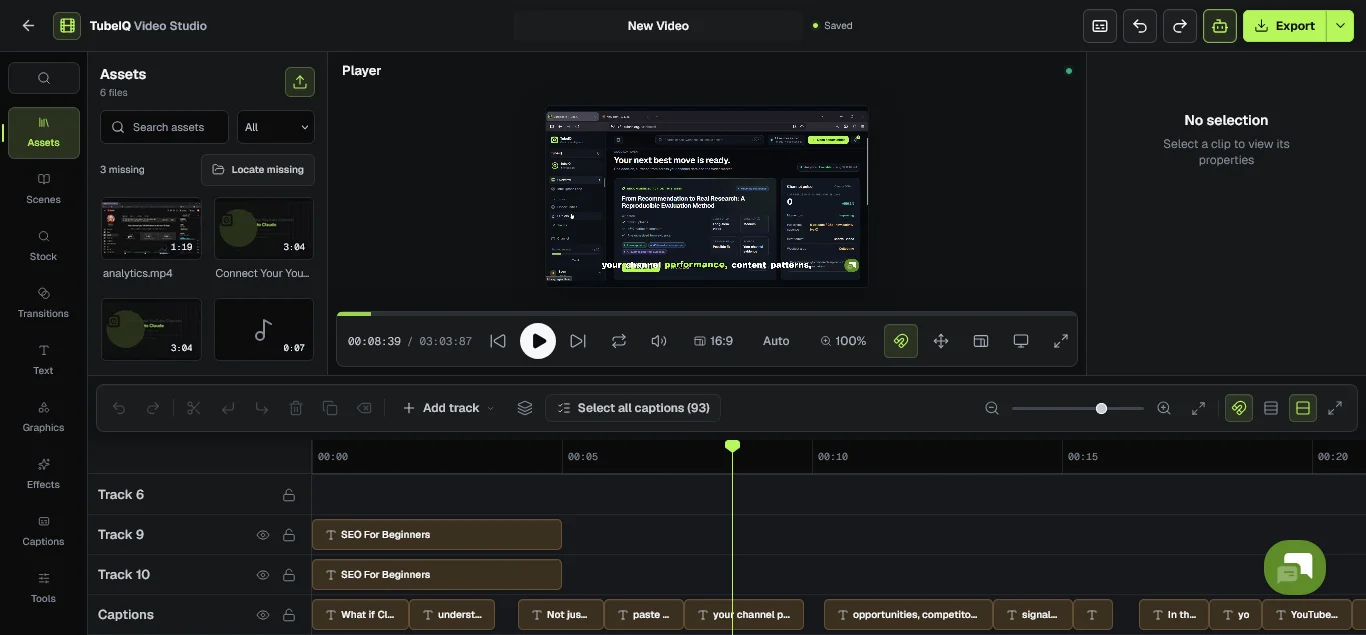
Create professional YouTube videos directly inside TubeIQ with a full-featured, browser based video editor. Video Studio brings your media, editing tools, captions, effects, and timeline together in one workspace without requiring separate desktop editing software.
Edit videos using a multi-track timeline, arrange clips, add text and graphics, apply transitions, customize captions, and preview your changes in real time. Export finished videos directly from your browser without relying on server-side rendering.
Planned capabilities include:
-
Multi-Track Timeline: Arrange, trim, split, and manage video, audio, text, and graphics across multiple tracks.
-
Media Library: Upload and organize videos, images, audio, and other creative assets.
-
Captions & Subtitles: Add and customize timed captions with editable styles and positioning.
-
Transitions & Effects: Enhance videos with visual effects, transitions, and motion controls.
-
Text & Graphics: Add titles, overlays, and branded elements.
-
Audio Editing: Manage music, voiceovers, and audio levels.
-
Browser-Based Export: Render and export completed videos using your own device, reducing dependence on server processing.
-
TubeIQ Integration: Planned connections to TubeIQ scripts, voiceovers, and other AI creation tools for a more streamlined workflow.
From raw footage to finished videos all within TubeIQ.
 Powered by ProductLift